I'll start making daily notes about my work, this shall be a collection of impressions but also of small code fragments which help me on my daily projects...
Friday, July 28, 2006


Monday, January 09, 2006
Eclipse and Java on USB Memory Stick
I bought myself a memory stick a few days ago, mainly to store data which I download in a internet coffee shops. I find it quite annoying to transport my laptop every time I just would like to read some mails...
Somehow I found portableapps.com which has a nice collection of tools (Firefox, Thunderbird, etc.) which can be copied on the USB memory stick and started from there. This makes it easy to use my favorite browser and mail client...
For me the next question was: can I install Eclipse and Java on the memory stick and use it? Yes, you can :)
Here a short description on what I did:
1.) Copy a current installation of Java to the memory stick. I really copied it, I didn't install it!
2.) Copy Eclipse on the memory stick.
3.) Write a simple batch file to start Eclipse.
that's it!
My directory structure on the memory stick looks like this:
%USB_MEMORY_STICK_ROOT%
| Eclipse.bat
+---Applications
+---jdk1.5.0_05
| \---bin
| \---javaw.exe
|
+---eclipse
\---eclipse.exe
Eclipse.bat looks like this:
.\Applications\eclipse\eclipse.exe
-data .\Projects
-vm .\Applications\jdk1.5.0_05\bin\javaw.exe
-vmargs -Xmx256M
Enjoy :)
Somehow I found portableapps.com which has a nice collection of tools (Firefox, Thunderbird, etc.) which can be copied on the USB memory stick and started from there. This makes it easy to use my favorite browser and mail client...
For me the next question was: can I install Eclipse and Java on the memory stick and use it? Yes, you can :)
Here a short description on what I did:
1.) Copy a current installation of Java to the memory stick. I really copied it, I didn't install it!
2.) Copy Eclipse on the memory stick.
3.) Write a simple batch file to start Eclipse.
that's it!
My directory structure on the memory stick looks like this:
%USB_MEMORY_STICK_ROOT%
| Eclipse.bat
+---Applications
+---jdk1.5.0_05
| \---bin
| \---javaw.exe
|
+---eclipse
\---eclipse.exe
Eclipse.bat looks like this:
.\Applications\eclipse\eclipse.exe
-data .\Projects
-vm .\Applications\jdk1.5.0_05\bin\javaw.exe
-vmargs -Xmx256M
Enjoy :)
Monday, December 19, 2005
Maven 2 - How To: Where to put the properties?
1) The properties, in Maven 1 in build.properties and project.properties, are stored in settings.xml
2) Create the settings.xml in your user directory
Under Windows XP, this is:
C:\Documents and Settings\<user>\.m2\settings.xml
If you have to configure a proxy, it would look like this:
<?xml version="1.0" encoding="UTF-8"?>
<settings>
<proxies>
<proxy>
<active/>
<protocol>http</protocol>
<username>user</username>
<password>passwd</password>
<port>8080</port>
<host>proxy-url</host>
<id/>
</proxy>
</proxies>
</settings>
3) Since settings.xml is not part of your workspace and won't be stored in the project repository, you don't have it within your development environment. I'm using Eclipse for my development and I included the settings.xml in my project as a linked resource to the file system.
This approach gives you the advantage, that you can edit settings.xml easily within Eclipse and you don't have to leave your development environment :)
* * *
Reference:
http://maven.apache.org/maven-settings/settings.html
Saturday, December 17, 2005
Maven 2 - How To: Multiple Module (flat project layout)
1) Create at least two Maven projects in a flat project layout...
%PROJECT_WORKSPACE%\%YOUR_PROJECT_MASTER%pom.xml
...
%PROJECT_WORKSPACE%\%YOUR_PROJECT_SLAVE%pom.xml
...
2) Define the <groupId> and <artifactId> of the modules...
%PROJECT_WORKSPACE%\%YOUR_PROJECT_MASTER%\pom.xml:
<project>
...
<groupId>somegroup.master</groupId>
<artifactId>master</artifactId>
...
</project>
%PROJECT_WORKSPACE%\%YOUR_PROJECT_SLAVE%\pom.xml:
<project>
...
<groupId>somegroup.slave</groupId>
<artifactId>slave</artifactId>
...
</project>
3) Define the modules in the master project...
Here I added first the artifactId, but it didn't work. I changed it to the directory and everything was fine.
%PROJECT_WORKSPACE%\%YOUR_PROJECT_MASTER%\pom.xml:
<project>
...
<modules>
<module>../%YOUR_PROJECT_SLAVE%</module>
</modules>
...
</project>
4) Add the <parent> and <dependency> element in the slave module...
%PROJECT_WORKSPACE%\%YOUR_PROJECT_SLAVE%\pom.xml:
<project>
...
<parent>
<groupId>somegroup.master</groupId>
<artifactId>master</artifactId>
<version>1.0-SNAPSHOT</version>
</parent>
...
<dependencies>
<dependency>
<groupId>somegroup.master</groupId>
<artifactId>master</artifactId>
<version>1.0-SNAPSHOT</version>
</dependency>
...
</dependencies>
...
</project>
5) Call mvn install...
First the master project will be called and than slaven... That's it :)
* * *
References:
- http://maven.apache.org/
- http://maven.apache.org/guides/introduction/introduction-to-dependency-mechanism.html
- http://maven.apache.org/guides/mini/guide-ide-eclipse.html
Maven 2 - How To: Add LICENSE.txt
1) Add LICENSE.txt to the root directory of your project...
%YOUR_PROJECT% pom.xml
LICENSE.txt
src site ...
2) Copy your license into LICENSE.txt
3) Include the <licenses> element in the pom.xml...
%YOUR_PROJECT%\pom.xml:
<project>
...
<licenses>
<license>
<name>The Apache Software License, Version 2.0</name>
<url>LICENSE.txt</url>
</license>
</licenses>
</project>
4) Inculde project ${reports} in site.xml
%YOUR_PROJECT%\src\site\site.xml:
<project>
...
${reports}
</body>
</project>
Maven 2 - Collection of How-To's
I'm currently migrating two projects to Maven 2 (http://maven.apache.org/) and decided that I'll document this within my blog.
Although the Maven documentation has grown a lot, I'm still having difficulties to find the right piece of documentation to get my things done. Often I have to check the Maven repository to see how the Maven guys did it. By the way - I think this is a great advantage of open source ;) I hope and I'm quite sure, that this will improve a lot within the next few weeks and months.
Since I forget very fast ;) (very-very short time memory), I'll write down a collection of How-To's, where I describe little tasks. Maybe this will be helpful for other people too...
Working Offline
Currently I'm spending many hours working offline and this wasn't very easy when I started doing it. I was used to have internet access 24x7. Since I'm in Thailand (see http://tomionthai.blogspot.com/) now and I don't have an internet access at the place I'm staying, I had to find a new way of working.
My first approach was saving the websites with Firefox (http://www.mozilla.org/) for offline reading and Google Desktop Search (http://desktop.google.com/) for indexing all the pages. After a while I switched from Firefox to HTTrack (http://www.httrack.com/) for downloading the pages, since it allows the download of a complete website with all the links and referenced pages. This approach was ok, but had its disadvantages like:
1) I had to come up with my own directory structure to save all the websites.
2) Using Firefox wasn't very comfortable since it tries to save the file with the URL file name. This is very unpleasant if you have a site providing dynamic content and it's using post - every URL looks exactly the same and you will have to rename each file you would like to save locally.
3) Some websites can't be downloaded with HTTrack (or at least I didn't find the right configuration). I spent hours to find the right configuration for downloading Maven (http://maven.apache.org/), but I wasn't very successful.
4) It took quite some time to start and configure HTTrack everytime I wanted to have a certain page for offline reading.
5) Often I downloaded much more than I wanted with HTTrack, which resultat in very long download times and waste of diskspace.
But the biggest drawback was, that this approach saved a lot of garbage on my laptop, which I dind't wanted. Most of the pages show headers, footers, menus and a lot of advertisement. By using Firefox or HTTrack all of this was downloaded as well and resultet in bad search results in Google Desktop Search, this because menus referenced to other pages with the actual content and this menu links contained my search key words, of course Google Desktop Search listed them too.
Finally I found a much nicer and even easier approach. My dream team is called PDFCreater (http://pdfcreator.sourceforge.net/, http:www.pdfcreator.de.vu/) and Google Desktop Search. Everytime I see a page, an article or some content I would like to read offline, I print it with PDFCreator and save the pdf file on my disk. First of all, many pages offer a printer-friendly version of the content which results in a nice print and in this case in a nice pdf file. I don't have to create complex directory structures anymore, I just created a simple structure with meta descriptions and I save all the pages/pdfs in these directories. Google Desktop Search has no problem indexing the pdf files and it's also nicer to read them in Acrobat Reader (http://www.adobe.com/) than in Firefox. The final advantage for me is, that I can easily backup all the files and I use them as my knowledgebase.
If you have to work a lot offline, but you still would like to read current articles from the internet, you might want to try this approach. If you have a better approach, I'm very interested in knowing it... thanks in advance :)
Thursday, December 15, 2005
Java XML Binding
I'm working right now on CreateTree, a simple tool for reading and
creating directory and file structures, CreateTree is a part of the BDT
project (http://bdt.sf.net/).
The model is defined in a XML Schema and finally transformed with Apache
XML Beans into a Java model.
Before I decided to use Apache XML Beans, I had a look at
https://bindmark.dev.java.net/, a project which compares Java XML
Binding tools.
Since I don't have much experience with bind tools, Bindmark is very
helpful and provides a lot of information.
Thursday, December 01, 2005
New Eclipse help plugin for eclipse-tutorial.dev.java.net available
New Eclipse help plugin for the tutorials at eclipse-tutorial.dev.java.net available
I developed a new Eclipse help plugin, containing all the tutorials from eclipse-tutorial.dev.java.net. With the new plugin, you can select the tutorials you would like to see and you don't have to download all of it at once.
This will help us to deliver new tutorials easier for the help plugin.
You can find the Eclipse help plugin under:
Enjoy :)
I developed a new Eclipse help plugin, containing all the tutorials from eclipse-tutorial.dev.java.net. With the new plugin, you can select the tutorials you would like to see and you don't have to download all of it at once.
This will help us to deliver new tutorials easier for the help plugin.
You can find the Eclipse help plugin under:
Enjoy :)
Tuesday, November 22, 2005
New visual tutorials available
I added four new tutorials to eclipse-tutorial.dev.java.net. The new tutorials are based on Eclipse 3.1.x and show some of the new features.
- Ant Code Templates
- Generating Ant Buildfile for Eclipse Java project
- Create a new Perspective
- How to use the Help System
https://eclipse-tutorial.dev.java.net/
Enjoy!
- Ant Code Templates
- Generating Ant Buildfile for Eclipse Java project
- Create a new Perspective
- How to use the Help System
https://eclipse-tutorial.dev.java.net/
Enjoy!
Saturday, October 15, 2005
Great Ranking for eclipse-tutorial.dev.java.net
Today I had a look at http://community.java.net/projects/top.csp to see, what rank the eclipse-tutorial.dev.java.net project has and I was completely surprised!
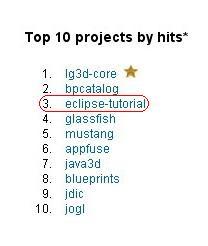 Correct me if I'm wrong, but it looks to me, that the other 9 projects in the list have a very close relation to java.sun.com. If this is right, I think the 3rd rank is simply great :)
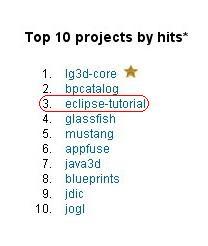 Correct me if I'm wrong, but it looks to me, that the other 9 projects in the list have a very close relation to java.sun.com. If this is right, I think the 3rd rank is simply great :)
Saturday, October 01, 2005
Joomla Developer
The Joomla community has a new development space provided by Sourceforge:
It's amazing to see, what momentum is behind some people :) I wish them all the best in developing Joomla and increasing the community!
It's amazing to see, what momentum is behind some people :) I wish them all the best in developing Joomla and increasing the community!
Tuesday, September 13, 2005
New Eclipse Plugin for Eclipse Tutorial
I have published a new Eclipse plugin for eclipse-tutorial.dev.java.net.
Update site: eclipse-tutorial.dev.java.net/update
Enjoy!
Update site: eclipse-tutorial.dev.java.net/update
Enjoy!
Saturday, August 06, 2005
Wednesday, August 03, 2005
Inversion of Control
Inversion of Control is a key part of what makes a framework different to a library. A library is essentially a set of functions that you can call, these days usually organized into classes. Each call does some work and returns control to the client.
A framework embodies some abstract design, with more behavior built in. In order to use it you need to insert your behavior into various places in the framework either by subclassing or by plugging in your own classes. The framework's code then calls your code at these points.
Martin Fowler - http://martinfowler.com/bliki/InversionOfControl.html
A framework embodies some abstract design, with more behavior built in. In order to use it you need to insert your behavior into various places in the framework either by subclassing or by plugging in your own classes. The framework's code then calls your code at these points.
Martin Fowler - http://martinfowler.com/bliki/InversionOfControl.html
Tuesday, July 26, 2005
How To Remove An Obsolet Workspace From Eclipse 3.1
Sometimes you would like to remove an obsolet workspace from Eclipse. Suppose you have made a test workspace to try some things out and now you don't wont and don't need it anymore.
If you remove the workspace from your disk, it'll still appear in the workspace launcher, when you start up Eclipse.
So, how do you get rid of it?
Ecplise is storing the workspace information in a preferences file called "org.eclipse.ui.ide.prefs". This file is located under "%ECLIPSE_HOME%\configuration\.settings" and contains a key named "RECENT_WORKSPACES". The value of this key contains a comma seperated list of workspaces, more precisely the path to the workspaces. If you delete one of the entries, it'll disappear from the workspace launcher.
What you have to do is the following:
If you remove the workspace from your disk, it'll still appear in the workspace launcher, when you start up Eclipse.
So, how do you get rid of it?
Ecplise is storing the workspace information in a preferences file called "org.eclipse.ui.ide.prefs". This file is located under "%ECLIPSE_HOME%\configuration\.settings" and contains a key named "RECENT_WORKSPACES". The value of this key contains a comma seperated list of workspaces, more precisely the path to the workspaces. If you delete one of the entries, it'll disappear from the workspace launcher.
What you have to do is the following:
- exit Eclipse
- delete the workspace from your disk
- delete the path pointing to your obsolet workspace in the mentioned preferences file
- start Eclipse
Friday, July 22, 2005
German translation of eclipse-tutorial.dev.java.net
The first german translation of eclipse-tutorial.dev.java.net is done. I figured out, that it's not that easy to translate tutorials :-)
Open Source Java Applikationen entwickeln mit java.net und Eclipse
Let me know, if there are some terrible translation mistakes!
Enjoy! :-)
Open Source Java Applikationen entwickeln mit java.net und Eclipse
Let me know, if there are some terrible translation mistakes!
Enjoy! :-)
Friday, June 17, 2005
Thursday, May 26, 2005

Monday, May 23, 2005
BDT - Build Development Tools
Wednesday, May 18, 2005
Maven & multiple source trees
Have a look at an interesting article about Maven and multiple source trees in Michael Nielsen's Blog: http://weblogs.java.net/blog/michael_n/archive/2005/05/maven_multiple.html
Build Environment Systems
When ever you start a new project you'll find out, that you have to ship the software at a certain point :-) and to do that there are many tasks involved:
Beside this, if your delivery will be tested by some testing folks on the customer side, they'll flood your bug tracking system, because some bugs will look quite different every time. And you won't hire some new people just to sort out the same bugs, would you? ;-)
To address these needs, most Java projects are using Ant. Ant is a quasi standard for building Java applications. The Apache Ant project describes itself as: Apache Ant is a Java-based build tool. In theory, it is kind of like Make, but without Make's wrinkles.
In Ant you can define targets and within the targets you have different tasks. The targets once more can have dependencies to other targets. If you are not familiar with Ant, have a look at "Writing a Simple Buildfile" tutorial from the Ant project. This will give you a good introduction.
If you start using Ant, you figure out, that you are doing the same things again and again. For example: your application is based on several components and you would like to compile each of them independently. You'll start writing a compile target for every component and at a certain point you'll try to refactor your build files so you can use one compile target for all your components.
I invested quite some time in my build files and started to use them in different projects. So I started to use my own build environment components. I'm not quite sure, if this is the right approache, since there are many projects out there which are doing the same thing... but usually much more sophisticated...
These projects are using Ant or extending it and building a set of predefined targets to use:
Another Apache project, addressing the need of a good build environment system is Maven. Maven itself is much more sophisticated than Ant and they use a different aproach. Maven is built around a project object model and is providing a huge set of goals (in Ant terms these would be targets). Beside this, Maven is able to deal with dependencies in your project.
Currently the Maven team is working on Version 2.0 of Maven. If you are interested in Maven 2.0 have a look at the project site: http://maven.apache.org/maven2/.
It's very much recommended, that you invest enough time in your build environment and that you maintain it as good as possible. You should keep in mind, that your build scripts are a part of your software and you should treat it with the same respect as your source code.
Some people might think, that a fully automated build environment is to expensive. But if you have a closer look at all the details and all the knowledge lying in your build environment and in your build process, you'll see that the positive aspects outweigh.
To understand the importance of a good build environment, you also should read the article of Martin Fowler about Continuous Integration.
- deliver the application as a zip file including a batch or shell script to execute it
- deliver the application with all the necessary deployment descriptors, security role assignments, etc., so the application can be deployed
- deliver an installer for one or many operating systems
- deliver it in any kind your customer would like to have it
- pack all the necessary libs for your application
- generate a working classpath (sometimes not that easy...)
- generate all the documentations
- generate the batch and shell scripts
- generate some testdata
- create the installer build files
- etc.
Beside this, if your delivery will be tested by some testing folks on the customer side, they'll flood your bug tracking system, because some bugs will look quite different every time. And you won't hire some new people just to sort out the same bugs, would you? ;-)
To address these needs, most Java projects are using Ant. Ant is a quasi standard for building Java applications. The Apache Ant project describes itself as: Apache Ant is a Java-based build tool. In theory, it is kind of like Make, but without Make's wrinkles.
In Ant you can define targets and within the targets you have different tasks. The targets once more can have dependencies to other targets. If you are not familiar with Ant, have a look at "Writing a Simple Buildfile" tutorial from the Ant project. This will give you a good introduction.
If you start using Ant, you figure out, that you are doing the same things again and again. For example: your application is based on several components and you would like to compile each of them independently. You'll start writing a compile target for every component and at a certain point you'll try to refactor your build files so you can use one compile target for all your components.
I invested quite some time in my build files and started to use them in different projects. So I started to use my own build environment components. I'm not quite sure, if this is the right approache, since there are many projects out there which are doing the same thing... but usually much more sophisticated...
These projects are using Ant or extending it and building a set of predefined targets to use:
- http://antlion.sourceforge.net/
- http://antworks.sourceforge.net/
- http://invicta.sourceforge.net/
- http://www.javagen.com/jam/index.html
- http://www.jayasoft.fr/org/modules/ivy/overview.php?
Another Apache project, addressing the need of a good build environment system is Maven. Maven itself is much more sophisticated than Ant and they use a different aproach. Maven is built around a project object model and is providing a huge set of goals (in Ant terms these would be targets). Beside this, Maven is able to deal with dependencies in your project.
Currently the Maven team is working on Version 2.0 of Maven. If you are interested in Maven 2.0 have a look at the project site: http://maven.apache.org/maven2/.
It's very much recommended, that you invest enough time in your build environment and that you maintain it as good as possible. You should keep in mind, that your build scripts are a part of your software and you should treat it with the same respect as your source code.
Some people might think, that a fully automated build environment is to expensive. But if you have a closer look at all the details and all the knowledge lying in your build environment and in your build process, you'll see that the positive aspects outweigh.
To understand the importance of a good build environment, you also should read the article of Martin Fowler about Continuous Integration.
Monday, May 16, 2005

FindBugs 0.8.8 - Code Analyzer
The FindBugs Java code analysis tool project has released version 0.8.8 with many feature enhancements. Those include detection for duplicate code in if/else statements, new function calls, increased detection of impossible casts, statistics saving, and more.
PMD 3.1
Tom Copeland had announced the release of version 3.1 of his Java code analyzer PMD. "It includes eight new rules, a slew of bug fixes, and better support for JDK 1.5. Several rules were optimized, for example, UnusedModifer now runs about ten times faster." A full change log is available.
Apache Maven 2.0 Alpha 2
The Apache Maven development team has announced the release of version 2.0 Alpha 2 of the software project management tool. "This release is expected to be much more architecturally stable, making early adoption a possiblity. At this point, there are still only the core plugins available."
Eclipse 3.1 Milestone 7
The Eclipse IDE project has released its seventh milestone for version 3.1. "M7 is the final milestone build of the Eclipse Platform 3.1 development cycle, and marks the official start of the 3.1 endgame." M7 features undo and redo features for refactoring, and many UI tweaks.
Sunday, May 08, 2005
New Visual Tutorials - eclipse-tutorial.dev.java.net

I've added three new Visual Tutorials to eclipse-tutorial.dev.java.net and modified the help plugin.
- Create a new class with Fields and a Constructor
- Refactoring, Rename a Field and a Method
- How to use the Update Manager
Enjoy!
Saturday, May 07, 2005
Application Server Matrix

TheServerSide.com is providing an Application Server Matrix. Have a look at http://www.theserverside.com/reviews/matrix.tss
Subscribe to:
Posts (Atom)